Point Interfaces
Business Object Point Definition Interfaces support a list of Business Object attributes, and are an integral component of a Business Object Package. Each Point Definition Interface in a package must have a unique name.
Point Definition Interfaces define custom, abstract attributes in native CygNet terms. Different point interfaces are available to point elements, and different sets of native attributes can be selected for different sets of points.
|
Point Definition Interfaces |
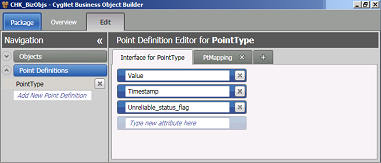
Creating, Editing, Copying, and Deleting Point Interfaces
To Create a Point Interface
- On the CygBOB menu, click the Edit tab to open the Point Definition Editor window.
- The Navigation pane is on the left. If the Point Definitions list is not already displayed, click on the down arrow to display the list of point definitions.
- Click Add New Point Definition and type in a name for the new Point Definition. This opens the Point Definition Editor for the newly named point definition interface.
- At the bottom of the Interface for… field, enter a name in the Type new attribute here text box and press Enter.
- Repeat step 4 for additional new attributes until all desired elements are entered.
- If desired, double-click in the name field of the new Interface in the Navigation pane to change the name of the new Point Definition Interface.
- Press Enter.
To Edit a Point Interface
- On the CygBOB menu, click the Edit tab to open the Point Definition Editor window.
- The Navigation pane is on the left. If the Point Definitions list is not already displayed, click on the down arrow to display the list of point definitions.
- Click to select the name of the Point Definition you want to edit from the list.
- The Point Definition Editor pane is on the right. Click to select the name of the Interface element you wish to edit.
- To edit a point definition interface item name, double-click in the text box and enter the new name in the text field to make the desired change.
- Press Enter.
To Copy a Point Interface
Copying a Point Interface can be achieved by exporting the interface with a new file name, and then importing the new file back into CygBOB from the Package page. Mappings can then be created or edited on the Edit page.
See File Import and Export Options for more information.
To Delete a Point Interface
- On the CygBOB menu, click the Edit tab to open the Point Definition Editor window.
- The Navigation pane is on the left. If the Point Definitions list is not already displayed, click on the down arrow to display the list of point definitions.
- Click to select the name of the Point Definition you want to delete from the list.
- Click on the X to the right of the Point Definition name to delete it.
- A message box will be displayed asking "Are you sure you want to remove this Point Definition?" Select Yes to delete the Point Definition or No to retain the Point Definition.


